

Skip to content
Menu

Managed IT services in Perth

IT support you'll actually want to call.

Managed IT support for Perth businesses, from engineers who know your name, your setup and how your business works. No phone tree and no ticket roulette. The same local team picks up every time you call.

  • 40+ Google reviews, many naming our engineers
  • 20+ yrs Some clients have stayed with us that long
  • 0% Offshored helpdesk or engineering
An empty helpdesk desk in a bright office, with a headset beside the keyboard and two monitors.
Who picks up Answered in Perth
ZBDMNWDD

Zak, Deon, Nathan, Daniel and the team. Engineers in Perth, WA, not a switchboard.

What happens when you call our helpdesk

Same problem. Very different morning.

Most IT support is built around tickets. Ours is built around people who already know your business. Pick a situation and see the difference.

Locked out of email at 8:45am, client meeting at 9.

The ticket-queue way

  1. Call a 1300 numberChoose from a menu. Hold.
  2. Log a ticketYou get a reference number and a promise of a callback.
  3. Wait for the callbackSomeone opens your file for the first time.
  4. Explain it againVerify, re-explain, reset. Meeting missed.

You explained it three times.

The CCP way

  1. Call usAn engineer in Perth, WA picks up.
  2. They already know youYour setup, your staff and your multi-factor authentication (MFA) are documented.
  3. Fixed on the callPassword reset and MFA re-registered while you wait.
  4. Checked properlyWe review the sign-in log to rule out a compromise.

You explained it once.

A new hire starts on Monday.

The ticket-queue way

  1. Fill in a portal formPick a request type from a dropdown.
  2. Laptop ordered lateNobody chased the supplier.
  3. Day one, no accessYour new hire reads the handbook on their phone.
  4. Sorted by WednesdayAccounts trickle through over a few days.

First impressions: not great.

The CCP way

  1. Tell us who and whenA name, a role and a start date. That’s it.
  2. Built before they arriveLaptop set up with apps, email and the right access.
  3. Ready on the deskSet up on-site, or couriered and ready to sign in.
  4. A friendly walkthroughLogins, MFA and who to call, in person.

Productive from the first morning.

The server stops at 9:30am.

The ticket-queue way

  1. Remote-only support“We’ll look into it,” from another time zone.
  2. EscalatedPassed to a second-level team.
  3. On-site next weekThe earliest a technician can attend.
  4. No explanationIt’s working again. Nobody says why.

Staff sent home. Cause unknown.

The CCP way

  1. Often flagged firstMonitoring alerts us, sometimes before you notice.
  2. An engineer remotes inSomeone who knows that server starts diagnosing.
  3. On-site if neededAn engineer comes to you.
  4. Plain-English wrap-upWhat happened, and what stops it happening again.

Back up before lunch.

Your practice software stops syncing.

The ticket-queue way

  1. “Not our problem”IT says it’s the software. The vendor says it’s IT.
  2. You play go-betweenForwarding emails between two support desks.
  3. Two tickets, no ownerReference numbers on both sides.
  4. Eventually fixedBy whoever blinks first.

You became the IT department.

The CCP way

  1. One call to usWhatever the cause, we own it.
  2. We ring the vendorEngineer to engineer, in their language.
  3. We stay on itUntil it works, not until it’s “handed off”.
  4. Written downThe fix is documented, so next time is faster.

You stayed out of it.

Your Perth IT support engineers

Our clients don’t review “the helpdesk”. They review Sam.

You get a named engineer who learns your setup, plus a small team who all know it too. When you call, you pick up a conversation instead of starting one.

SB

Sam

IT technician · since 2025

Sam ran the helpdesk team at another Perth managed service provider for five years, across non-profit, mining and medical clients. He brings deep Microsoft 365 experience and reads a ticket fast.

“Went into a panic today over a document that hadn't been updating and Sam spent time and managed to recover it.”

Jacqui & Steve Wood · Google review
  • ZB

    Zak

    Team lead · since 2012

    Zak leads a team of nine engineers and runs standards, escalations and the on-call rotation. Clients asked for him by name for long enough that the promotion was obvious.

  • DM

    Deon

    Lead DevOps · since 2011

    Deon leads our DevOps work: the pipelines, monitoring and scripts that stop the team solving the same problem twice. Fifteen years at CCP, across Microsoft, virtualisation, networking and cybersecurity.

  • NW

    Nathan

    IT technician · since 2024

    Nathan was a web developer at a CCP client before he joined in March 2024. When you need a custom link between systems, or a small tool no product covers, he builds it.

  • DD

    Daniel

    IT technician · since 2022

    Daniel handles day-to-day tech work and picks up the web and internal tooling jobs. He has freelanced in web development and design since 2010, and holds a Certificate IV in IT.

What’s included in managed IT services

Everything a good IT department does. None of the hold music.

One fixed monthly fee per user covers the day-to-day, however often you call. Bigger projects are quoted up front, in writing, before any work starts.

Several new laptops lined up on a timber workbench, powered on and charging, ready to be set up for new starters.
  • Unlimited helpdesk

    Phone, email or Teams. Answered in Perth by engineers, not a call centre.

  • On-site support across Perth

    When it needs hands on hardware, an engineer comes to you.

  • 24/7 monitoring

    Devices, servers and networks watched around the clock. Most issues are fixed before anyone notices.

  • Patching & updates

    Windows, macOS and business apps kept current, outside working hours.

  • Microsoft 365 management

    Licences, mailboxes, Teams and SharePoint set up properly and kept tidy.

  • Backups, restore-tested

    Checked daily and test-restored on a schedule, so they work when you need them.

  • New starters & leavers

    Laptop, accounts and access ready on day one. Removed the day they leave.

  • We deal with your vendors

    Internet provider, printer company, practice software. We make the call so you don’t have to.

  • Your systems, documented

    Network, accounts and setup written down and yours to keep. You’re never held hostage.

  • Face-to-face reviews

    Regular sit-downs on what’s ageing, what’s at risk and what to budget for.

  • Hardware & licensing

    Business-grade equipment we would use ourselves, sourced and set up for you.

  • Core security, built in

    Endpoint detection and response, DNS filtering and email protection on every plan.

How much does managed IT support cost?

One fixed fee per user. No onboarding fees.

You should never hesitate to call because you’re worried about the bill. So the day-to-day is covered, and anything bigger is quoted before we start.

Our standard agreement runs for three years, and onboarding costs you nothing. If you ever leave, we hand over the documentation and credentials, with no hostage-taking.

  • In your monthly fee

    • Unlimited helpdesk calls
    • Remote and on-site support
    • 24/7 monitoring and patching
    • Core security layers
    • Backup checks and test restores
    • Starters, leavers and regular reviews
  • Quoted up front

    • Not included: New hardware and licences
    • Not included: Office moves and fit-outs
    • Not included: Migrations and major upgrades
    • Not included: New systems and projects

    Every quote is itemised, including what we think you can do without.

How onboarding with a new IT provider works

Switching IT providers, without the awkward conversation.

We handle the handover with your current provider. Your staff keep working throughout, and meet their new engineer in person.

  1. Step 1 · Free

    A conversation, not a pitch

    45 minutes with an engineer and a light-touch check of your email, accounts, backups and devices.

  2. Step 2 · Within a week

    Plain-English report and fixed quote

    What’s at risk, what’s fine and what it costs, in priority order. Keep it, whatever you decide.

  3. Step 3 · First 3 months

    Onboarding, face to face

    We take over support, document everything and work through the gaps. Your staff meet their named engineer in person.

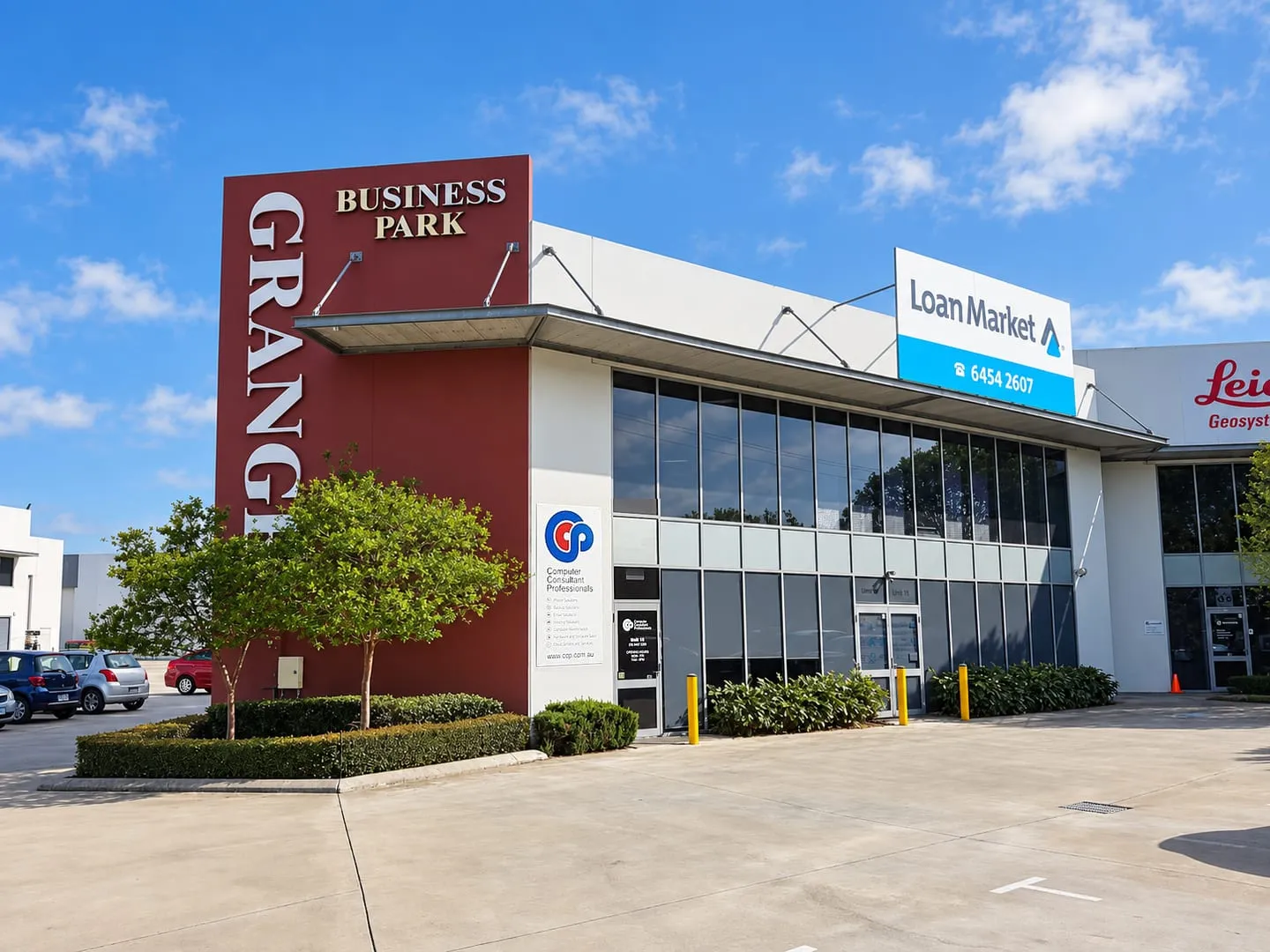
The CCP office at Unit 18, Grange Business Park, 8 Tomlinson Road, Welshpool, with the CCP sign beside the entrance.

On-site IT support across Perth

Close enough to turn up.

Most fixes happen remotely in minutes. When they don’t, our Welshpool office is a short drive from most of Perth. An engineer can be at your desk, not scheduling a visit for next week.

On-site IT support across Perth, including

  • Welshpool
  • Perth CBD
  • Belmont
  • Kewdale
  • Canning Vale
  • Osborne Park
  • Malaga
  • Fremantle
Will I actually talk to a person?
How much does managed IT support cost in Perth?
What size businesses do you support?
Can you work alongside our in-house IT person?
How does managed IT compare with hiring IT staff or paying by the hour?
How long is the agreement?

Talk to a person, not a portal.

Book a free 45-minute IT review with a Perth engineer. You get a plain-English summary of what’s working, what’s at risk and what it would cost to fix. It’s yours to keep either way.

Or call (08) 9467 2269

What’s bugging you
Staff

A Perth engineer, not a salesperson, replies within one business day.

We hold ISO/IEC 27001:2022 certification from BSI, certificate IS 840964.